Trade management · Binance USDⓈ-M futures
Your Binance futures trades, managed while you sleep.
Wallbot manages your Binance futures trades for you: protective stops placed on the exchange, breakeven, tiered trailing, alerts, and monitoring around the clock. You keep trading your way; your money stays in your own Binance account.
Accounts are open. Connecting your Binance account and Guard (Wallbot managing your trades) are switched on in a later step; we'll tell you by email.
Crypto futures are high-risk; you can lose your entire margin. You are responsible for checking that using this exchange and crypto trading are legal where you live.
Trade management
You pick the trades. Wallbot looks after them.
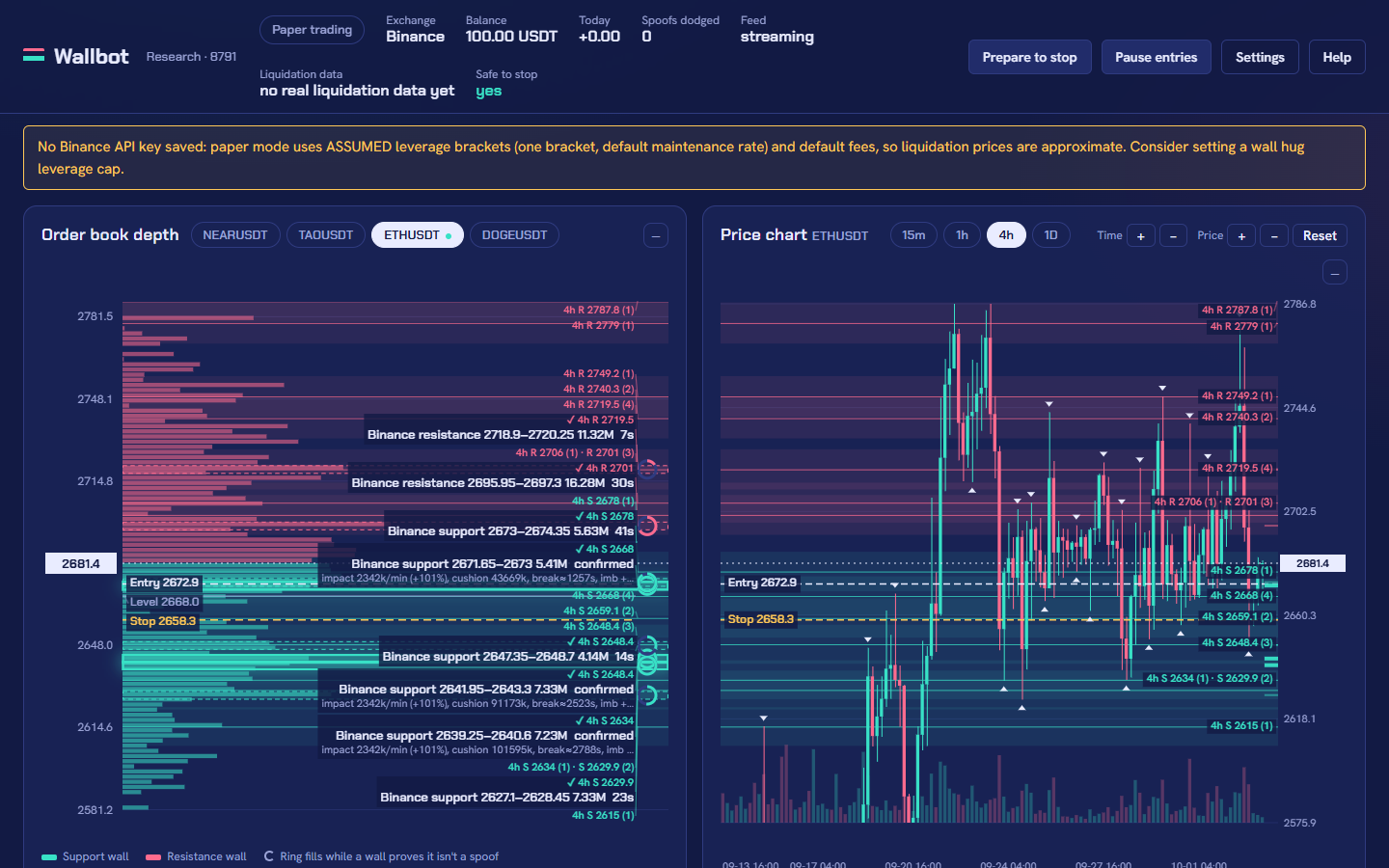
Open positions on Binance the way you always do. Wallbot watches them every second and keeps a stop order on the exchange for each one. Every rule below is a setting you can see and change.
Auto-manage your own positions
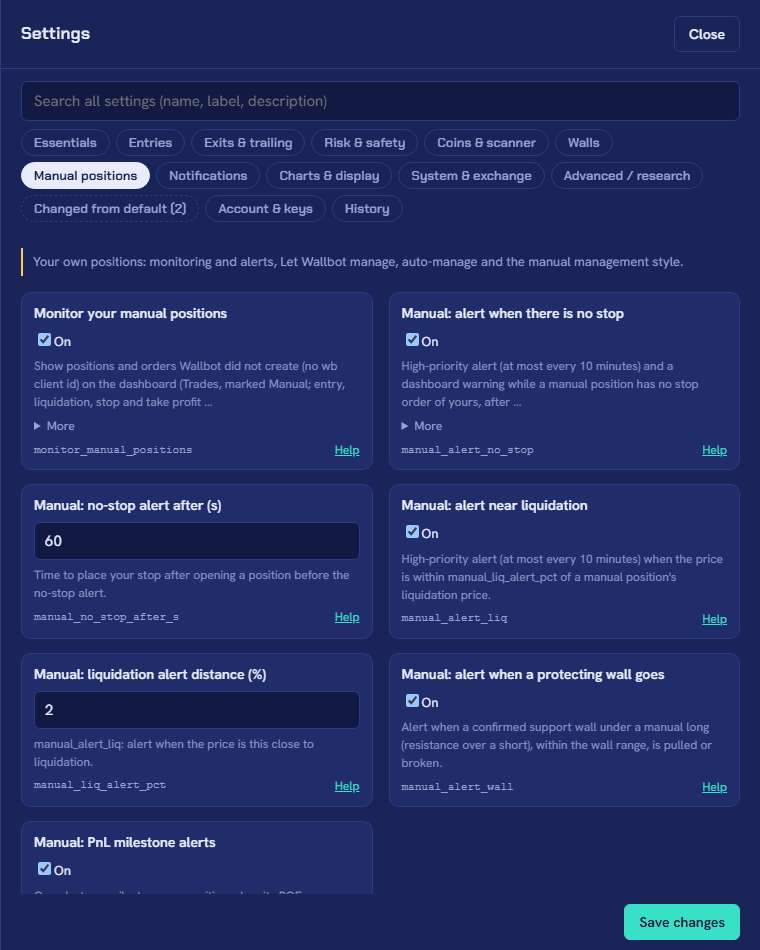
When you open a position yourself, Wallbot can take it over: it keeps your stop, or places one based on the coin's volatility with a loss cap you choose, always before the liquidation price.
Manual style
Exit rules made for hand-picked trades: wider trailing tiers, breakeven at the return you choose, and no order-book exits. Positions Wallbot did not open are clearly marked "Manual".
Alerts
Email and push notifications when a position has no stop, the price nears liquidation, a stop is tightened, a position closes, or your API key stops working. High-priority alerts are kept for what needs you now.
Liquidation safety
Stops are checked against Binance's own liquidation formula and margin brackets, so a stop never sits beyond the liquidation price. Isolated margin keeps one position from draining the others.
Breakeven
Once a trade reaches the return you set, the stop on Binance moves to your entry price plus fees.
Tiered trailing
The stop follows the best price in steps you define, for example keep 25% of the peak gain from one level and 50% from a higher one. It only ever moves in your favour.
Monitoring while you sleep
Orders and positions are compared with Binance every minute, and you get a high-priority alert if a position is found without its stop. After a server restart, Wallbot starts paused and alerts you.
Verified results
After every close, Wallbot checks Binance's own fills, fees, funding and exit price against its record. If they differ, Binance's numbers win and you get a "trade corrected" note.
Works with your account setup
One-way or Hedge Mode. You choose which positions Wallbot manages; anything you exclude is only watched, never touched.
Create a trade-only key
In Binance, make an API key with futures trading on, withdrawals off and access limited to Wallbot's IP address.
Choose what Wallbot manages
All your positions or only some, with your stop or a volatility-based one, and your breakeven and trailing steps.
Trade as usual
Wallbot places and moves the stops on Binance and tells you what it did. You can pause it or take a position back at any time.
High risk · off by default
Optional: automated trading
With automated trading on, Wallbot opens positions on your account by itself. You may lose money, including your entire margin.
If you want it, Wallbot can also enter trades for you. You decide the rules: it is built to follow your own strategy, not a secret one.
- Your coins and your limits: which coins, how much margin per trade, maximum leverage, maximum open positions, daily loss limit.
- Your entries and exits: entry model, stop placement, take profit and trailing, separately for each group of coins.
- Practice first: paper trading on real market data, with no money at risk, before you switch anything on.
- Off switch: pause new entries at any moment; open positions keep their stops on Binance.
Pricing
Simple plans
Every plan gets the same trade-management features. The plans differ only in how often you can change your settings.
Referral (free, code WALLBOT)
Free
with referral code WALLBOT
- Guard: watches your positions and keeps an exchange-side stop
- Guard: breakeven stop
- Guard: trailing stop
- Guard: alerts (in-app and email)
- Settings can be changed any time
Monthly
10 USDT / 30 days
available when Guard launches
- Guard: watches your positions and keeps an exchange-side stop
- Guard: breakeven stop
- Guard: trailing stop
- Guard: alerts (in-app and email)
- Settings can be changed once per 30 days
Flexible
20 USDT / 30 days
available when Guard launches
- Guard: watches your positions and keeps an exchange-side stop
- Guard: breakeven stop
- Guard: trailing stop
- Guard: alerts (in-app and email)
- Settings can be changed any time
Paying for a plan
Paid plans become available when Guard launches (Wallbot managing your Binance trades). Until then, creating an account, the free referral plan with code WALLBOT (checked by hand, usually within 24 hours) and support are available. We'll tell you by email when paid plans open; payments will go through Binance Pay.
No refunds. Trade at your own risk.See the Refund Policy and the Risk Disclosure.
Trust and safety
Your money never leaves your account
Wallbot sends orders to Binance through an API key you create and control. It cannot move your funds.
Funds stay with you
Your money stays in your own Binance account. We never hold it and never receive deposits for trading.
Trade-only API keys
The key needs futures trading only. Wallbot refuses a key that allows withdrawals.
IP-restricted
The key only works from Wallbot's server address, so a copied key is useless elsewhere. You can delete it in Binance at any time.
Stops live on Binance
Protective stops are orders resting on the exchange, so they still trigger even if our server is down.
Risk and eligibility
Please read before you join
Crypto futures are high-risk; you can lose your entire margin. You are responsible for checking that using this exchange and crypto trading are legal where you live.
A stop limits a loss only at the price where it fills. In fast or gapping markets it can fill worse, and exchanges can have outages. Wallbot is software, not investment advice, and makes no promise of profit. Read the full Risk Disclosure.
Questions
Will Wallbot make me money?
We make no profit claim. Trade management decides how a position is protected and closed, not whether your trades are good. Automated trading is optional and risky; its real live record, losses included, is shown above.
Can Wallbot withdraw or move my funds?
No. The API key you create is trade-only with withdrawals disabled, and Wallbot refuses a key with withdrawals enabled. Your funds stay in your Binance account.
What happens if your server goes down?
Your stops are orders resting on Binance, so they still trigger. While the server is down, stops are not moved (no new breakeven or trailing steps) until it is back; you get an alert when it restarts.
Which exchanges are supported?
Binance USDⓈ-M perpetual futures, in One-way or Hedge Mode.
Am I allowed to use it where I live?
That is your responsibility to check. Crypto futures and Binance are restricted or banned in some countries. Do not use Wallbot where they are not permitted.
Can I cancel?
Yes, at any time. There are no refunds; see the Refund Policy. When a plan ends, Wallbot stops managing your positions but never closes them, and the stops already on Binance stay in place.
Create your account
Sign up with your email address, choose a plan, and follow progress in your account. Questions? Use the contact form.